


Manual
Saturation Box
Version 0.3.4 · Adrestia Audio · adrestia-audio.com
Saturation Box is four analog saturators built on circuit and magnetics physics: a 12AX7 triode preamp stage, an EL84 push-pull output stage, magnetic tape, and an iron-core transformer. Each is a model of the thing itself, not a curve that approximates it, so it responds to how you play. The triode's bias shifts under a hard hit and swells back. The pentode's supply sags and recovers. Tape saturates its highs first, so transients round instead of clip. Iron folds the low end first and leaves the top alone.
Free. AU and VST3 for macOS 11 and later, Apple Silicon and Intel; VST3 for Windows 10 and later, 64-bit. No account, no dongle, no subscription.
At a glance
- Pick a model: TRIODE, PENTODE, TAPE, or XFMR.
- Turn DRIVE up until it sounds right. With AUTO GAIN on (the default), the level stays put, so what you hear changing is the character, not the volume.
- Pull MIX back until the effect sits in the track.
- Tap BYPASS to hear what you started with. The lamps go dim and the sound goes clean, at the same level and in time with the track.
That's the whole method. Everything else on the panel is for shaping where and how the saturation lands.
Installing
Requirements
- macOS 11 (Big Sur) or later, Apple Silicon or Intel (one universal installer); or Windows 10 or later, 64-bit
- A host that loads Audio Units or VST3: Logic Pro, Ableton Live, Cubase, Reaper, Studio One, Bitwig, and others. On Windows, VST3 only.
Mac
- Download the installer from adrestia-audio.com/plugins/saturation-box.
- Open it. It is signed and notarized by Apple, so there is no Gatekeeper workaround.
- It installs to
/Library/Audio/Plug-Ins/Componentsand/Library/Audio/Plug-Ins/VST3. - Restart your DAW, or rescan plugins. In Logic: Preferences → Plug-in Manager → Reset & Rescan Selection.
- Find it under Adrestia Audio → Saturation Box.
Windows
- Download the installer from the same page, choosing Windows.
- Run it. The installer and the plugin are code-signed, so Windows opens it without a warning. There is no folder to choose.
- It installs to
C:\Program Files\Common Files\VST3. - Restart your DAW, or rescan plugins.
- Find it under Adrestia Audio → Saturation Box.
The Windows build is newer than the Mac one and has been in fewer hands, so it is marked beta. If anything looks or sounds off, write to hello@adrestia-audio.com.
Updating: run the newer installer over the old one. Sessions keep loading; presets and settings carry over.
Uninstalling: on a Mac, drag the two plugin files to the Trash. On Windows, use Add or remove programs.
The panel
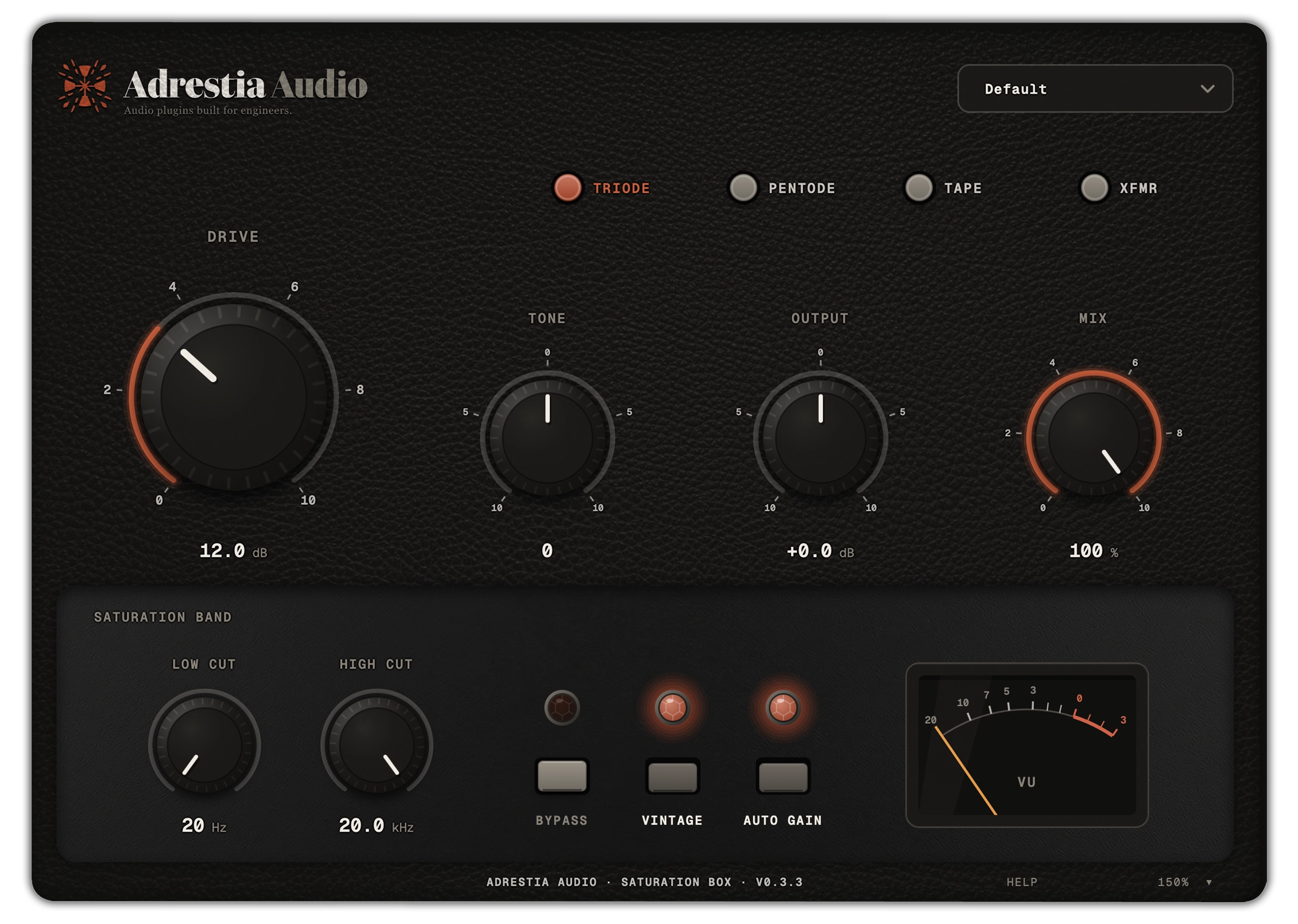
- Header: the logo and the preset menu.
- Model keys: four round keys with printed legends; the selected one lights.
- Main row: Drive is the hero control; Tone, Output, and Mix beside it.
- Saturation Band well: Low Cut and High Cut set the frequency range the saturator works on; three jewel-lamp-and-key units, Bypass, Vintage and Auto Gain; and the VU meter, which shows how hard the stage is being driven. The lamps waver a little more as you drive the unit. With Bypass engaged everything that lights dims.
- Footer: the version, a HELP switch, and a size badge. Click the badge for window-size presets, or drag the window's corner.
Every control has a one-line description. Switch HELP on in the footer and it appears when you hover. It is off by default.
The four models
All four share the same surrounding chain. They differ in what happens to the signal in the middle.
TRIODE
A class-A 12AX7 preamp stage. Warm and second-harmonic: nearly clean at low Drive, thicker as you push it, and only crunchy when both ends of the stage run out of room. A hard hit holds the stage down for a moment and it swells back, the way a real stage does.
Reach for it on vocals, bus glue, anything that wants expensive warmth.
PENTODE
A pair of EL84s in push-pull, the circuit behind the classic British combos. Odd-harmonic, brighter and more aggressive than the triode, with a crunch that arrives around the middle of the knob. Hit it hard and the supply sags for a moment, then recovers.
Reach for it on drums, guitars, anything that should bark when hit.
TAPE
Magnetic tape of the 456 class at 15 ips. Gentle, symmetric, third-harmonic saturation that takes the highs first, which is what rounds transients. There is no attack or release: what people call tape compression is the curve itself, so nothing pumps. Vintage switches to an older, softer, noisier stock on a slightly worn head.
Reach for it on the mix bus, stems, and "finish this" duties around 8 to 12 dB of Drive.
XFMR
A line amplifier driving an iron-core line transformer. Clean until it isn't, and the grit lives in the low end: push it and the lows thicken while the mids stay clean, until at high Drive the amplifier itself runs out of rail.
Reach for it on bass, kick, and low-end weight without dulling the top.
Switching models is click-free: the outgoing model keeps running briefly while the new one fades in.
Controls
| Control | Range | Default | What it does |
|---|---|---|---|
| Model | Triode / Pentode / Tape / Xfmr | Triode | Which circuit the signal goes through |
| Drive | 0 to +36 dB | 12 dB | How hard the circuit is hit |
| Tone | −100 to +100 | 0 | Tilt before the saturator: dark left, bright right |
| Output | −12 to +12 dB | 0 | Trim on the wet signal only |
| Mix | 0 to 100 % | 100 % | Dry/wet blend, phase-coherent |
| Low Cut | 20 Hz to 2 kHz | 20 Hz | Below this, the signal stays clean |
| High Cut | 1 kHz to 20 kHz | 20 kHz | Above this, the signal stays clean |
| Auto Gain | on / off | on | Holds the level as Drive changes |
| Vintage | on / off | off | An older, noisier tube; on Tape an older stock |
| Bypass | on / off | off | True bypass, also driven by the host's bypass |
Drive is the one knob that matters. Everything downstream scales with how hard the circuit is hit, and each model loses top the way its own circuit does, so Drive changes the character, not the bandwidth. With Auto Gain on, turning it up does not turn the track up; judge the character and set the level with Output.
Tone is applied before the saturator, so it changes what the circuit is fed rather than equalising the result. Brighter means the highs saturate harder; darker means the lows do. There is a light detent at zero.
Output trims the wet signal only, after the model and before the Mix blend, so it does not touch the dry signal in a parallel setup.
Mix blends dry and wet with the dry path delayed to match, so the blend is phase-coherent at every frequency. You can run 30 % Tape on a mix bus without comb filtering.
Low Cut and High Cut set the band the model works on. Everything outside it bypasses the saturator on a phase-matched clean path. Use it to saturate a kick without fuzzing the sub, or a vocal without adding grit to sibilance.
Bypass runs the signal through the same latency-matched dry path the host's bypass uses, crossfaded so it is click-free. While engaged, the knob arcs and the lamps dim.
Vintage deepens the slow bias wander of the tube models and raises their noise to that of an old tube; on Tape it is the older stock. Subtle, and nothing gimmicky: no hum, no crackle. The noise sits inside the circuit, so it fades out when nothing is playing.
VU meter reads how hard the selected model is being driven, with real VU ballistics. The red zone means the circuit is working hard, not that anything is clipping; there is no hard clip anywhere in the chain.
Knobs: drag up or down; hold Shift, or ⌘ on a Mac and Ctrl on Windows, for fine control. Double-click resets to default. Click the readout to type a value ("1k" works in the frequency fields). The mouse wheel nudges.
Auto Gain
A saturator gets louder as you drive it, and louder sounds better, so it is hard to judge whether the character is better. Auto Gain holds the level steady as Drive changes. It is on by default.
The correction was measured for each model at normal operating level and is applied as you turn the knob. There is no level detector and no compressor: it is fixed and instant, and it does not react to your music. At operating level, on broadband material, Drive changes tone and density, not loudness. Material that is much quieter than operating level still gains a few dB at high Drive, because the circuit is in its linear region there; that is how the hardware behaves too.
With Auto Gain off, the unit behaves like the hardware: unity gain at Drive 0, then louder as it is driven. Useful when you want to hear exactly what the circuit does to level, or when feeding something level-sensitive downstream. Toggling it is silent.
Presets
Nine factory presets, in the header menu and as host programs. Loading one sets every control. The chosen preset name is saved with your session.
| Preset | Model | Drive | Tone | Mix | Low Cut | High Cut | Vintage | Idea |
|---|---|---|---|---|---|---|---|---|
| Default | Triode | 12 dB | 0 | 100 % | 20 Hz | 20 kHz | off | A good starting point on anything |
| Warm Glue | Triode | 8 dB | −20 | 65 % | 20 Hz | 20 kHz | off | Bus warmth, parallel |
| Vocal Heat | Triode | 14 dB | +10 | 40 % | 120 Hz | 20 kHz | off | Presence on a vocal, lows left clean |
| Drum Bus Crunch | Pentode | 18 dB | +15 | 50 % | 60 Hz | 20 kHz | off | Drums that bark; sub stays tight |
| Scorch | Pentode | 30 dB | +30 | 100 % | 20 Hz | 20 kHz | on | Full-on fuzz |
| Tape Master | Tape | 10 dB | −10 | 100 % | 20 Hz | 20 kHz | off | Mix-bus finish |
| Cassette | Tape | 22 dB | −35 | 100 % | 60 Hz | 12 kHz | on | Lo-fi, dull, hissy |
| Console Push | Xfmr | 10 dB | 0 | 80 % | 20 Hz | 20 kHz | off | Console-style weight |
| Iron Bass | Xfmr | 20 dB | −10 | 100 % | 20 Hz | 8 kHz | off | Bass and kick, top end untouched |
Output is 0 dB in every preset. Auto Gain is not stored in presets; it stays as you set it.
Working with it
Judging Drive. Leave Auto Gain on, start at 12 dB, sweep up and down. When the sound is right, stop. If you have to turn Output up afterwards, you were listening to loudness, not tone. Go back and check.
Parallel saturation. Turn Drive up further than you would in series, 20 to 30 dB, then bring Mix down to 20 to 40 %. The blend is phase-coherent, so you get density without smear.
Sources with sub content (bass, kick, a full mix): set Low Cut around 40 to 80 Hz so the sub passes clean, and let the model work on the body.
Sibilant or airy sources: High Cut at 8 to 12 kHz keeps the top end out of the saturator.
| Want | Try |
|---|---|
| Warmth and glue, invisibly | Triode, 6 to 10 dB, Mix 50 to 70 % |
| Attitude, bite, forwardness | Pentode, 14 to 20 dB |
| Density and a rounded top | Tape, 8 to 12 dB |
| Weight in the low end only | Xfmr, 10 to 20 dB, High Cut 8 kHz |
| Distortion as an effect | Pentode, 28 to 36 dB, Vintage on |
Tone before, EQ after. Tone changes what the circuit sees. To correct the result, use an EQ after the plugin.
Gain staging into it. The models are calibrated around −18 dBFS RMS. Hotter pushes every model harder at a given Drive; quieter and you will use more Drive for the same effect. Both are fine, but it explains why the same setting sounds different on different tracks.
In your DAW
Latency. 61 samples at 44.1 and 48 kHz (about 1.4 ms), less at higher rates, reported to the host so delay compensation keeps everything aligned. Host bypass runs through the same delay, so toggling it does not shift the track in time.
Automation. Every control can be automated, without zipper noise. Model switches crossfade. Presets chosen from the menu are recorded by hosts writing automation.
Session recall. All parameters, the preset name, and the window size are saved with the session.
Window size. Drag the corner, or click the size badge in the footer for 100 to 200 %. The size is remembered per instance, and the last size you chose becomes the default for new ones.
Sample rates. 44.1 to 192 kHz, mono or stereo. The circuits are oversampled at every host rate, so CPU is a few percent of one core per instance.
Measured behaviour, harmonics by Drive and model, aliasing, noise floor and CPU, is published for every release on the measurements page.
Questions
Is it really free? Yes. Your email gets you the download and release announcements, nothing else; one-click unsubscribe. If we ever charge for it, the version you have stays yours.
Drive changed the level even with Auto Gain on. Auto Gain is exact at operating level, around −18 dBFS RMS. Much quieter material still gains with Drive, because the circuit is in its linear region there.
I hear hiss with nothing playing. The plugin's own noise only runs while signal is passing, so hiss on an idle track is coming from upstream. If the track is armed with a live input, the plugin amplifies the interface's own noise by the Drive amount, like any preamp would.
Which model should I start with? Triode on vocals and bus glue, Pentode on drums that should bark, Tape on the mix bus, Transformer on bass. Then break those rules.
Windows? Yes, VST3, 64-bit, on the same download page. It is marked beta because it is newer and has been in fewer hands than the Mac build. Tell us how it goes.
Something is wrong. Write to hello@adrestia-audio.com.
Terms of use
Saturation Box is provided as is, without warranty of any kind. Audio software can clip, crash, feed back, or otherwise behave in ways you didn't plan for; you are responsible for your levels, your monitors, your hearing, and your session backups. To the fullest extent allowed by law, Adrestia Audio is not liable for any damage, loss of work, or other harm that results from using it.
It is free to use for any music project, personal or commercial. Please don't redistribute the installer, resell it, or strip the branding.
Downloading asks for an email address, used only for release announcements, with a one-click unsubscribe in every message.
The full terms and the privacy policy are at adrestia-audio.com/terms and adrestia-audio.com/privacy. Questions: hello@adrestia-audio.com.
© 2026 Adrestia Audio. All rights reserved.